


 Mahnoor Khan
  September 16, 2026
  Saher NaseemDecember 8, 2017
Time is of the essence when you are operating on a shoe-string budget, laboring industriously to realize your business goals. In the midst of a chaotic rat race, a great calendar serves as an accommodating personal assistant that keeps your tasks flowing smoothly. Here, we are in no way talking about the dull calendars hanging from your walls, but rather the innovative apps that make sure you find it a breeze to manage your hectic life.Without a calendar app, most business owners and first-time entrepreneurs would miss appointments, forget important meetings, and neglect to comply with stringent project deadlines.
But keep in mind that a calendar app is not the perfect choice for everyone. Every person has a unique workflow and different schedules. Some want their calendars to be simple and streamlined while others prefer customizable and robust calendar apps that effectively track tasks and notes along with important meetings and other events.
However, while your smartphone and laptop already come equipped with a calendar app, there are a number of alternatives that startup founders and entrepreneurs can use to boost their productivity and grow their business faster.
Table of Contents
Calendar apps have a basic function: To remind you of an important task or event, even when it completely slips your mind. However, the best calendar apps are not only functional, they are actually fun to use and help make entrepreneurs ultra-productive.
The best calendar apps incorporate these features that make them so awesome!.
If adding a task or any event entails you to click your finger raw, or includes incessant tapping or menu exploration, this clearly shows that the app is intricate and difficult to use. If you are unable to find your schedule at a glance, you will definitely not enjoy using it. User friendliness is the key feature that makes a calendar app more effective.
A beautiful, aesthetically pleasing and uncluttered user interface make you use your calendar app several times a day. It offers a pleasant user experience. Beyond an aesthetically appealing design, the user interface should be intuitive, and able to tell different types of events apart, in addition to helping you glimpse a bird’s eye view of your schedule.
Most calendar events require many people. To keep your team coordinated during such calendar events, you can invite other people to view your calendar or even subscribe to published calendars. It will be an excellent opportunity for the entire team to plan a meeting date.
A calendar app that seamlessly works across multiple devices (mobile and desktop both) can give you an immediate access to your schedule. Since we hardly work on a single platform these days, a cross-platform app is well-received.
If you are a busy entrepreneur who has to grapple with juggling a staggering number of tasks at once, power features such as customizable views and integration with online task management apps will greatly help you make the most out of your calendar app.
Here is the list of best calendar apps that you need to organize your day and complete all your tasks on time. Peruse through our list and find the best digital assistant for your business and personal life.

A survey suggests that Google calendar is the most famous calendar app around the globe. It allows you to keep multiple calendars for your business, personal life, vacations and more – all in one place. You can use your existing Google account to use Google Calendar.
The color coding feature allows users to quickly identify significant events. Moreover, the visibility feature of calendars allows you to show or hide calendars to help you concentrate on particular events or tasks. The calendars allow you to filter out work-related events and appointments and only keep in view important holidays.
Google Calendar can easily integrate with Gmail, so you can create a calendar event or appointment from an email or check your colleagues’ schedules along with your own. Inviting your co-workers to an event is another plus point of Google Calendar.
Google Calendar can also integrate with other apps such as Google Sheets, Trello and Evernote.

Apple Calendar is the default calendar application on all OS X and iOS devices. It means that you can keep your calendar synchronized on all iOS devices and also through the web via iCloud. The widespread application can easily be accessed from other calendars such as Google Calendar.
A user-friendly and clean interface of Apple Calendar easily lets the user’s attention go to events instead of the application itself. This user-friendly calendar is easy to use if one knows how to operate iOS devices. You can make use of just one plus sign to create events and add titles, locations, reminders, notes, or invites.
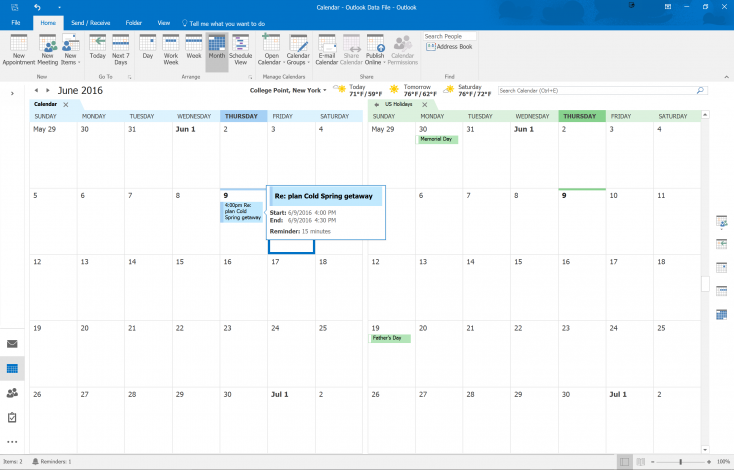
One of the best calendar apps is Microsoft Outlook which serves as a personal information manager that notifies you about your next meeting or appointment. The Outlook app can easily integrate with your email, allowing you to view your calendar, emails, notes, contacts and tasks – all in one unified place. To put it in a nutshell, Microsoft Outlook is one of the best productivity tools for entrepreneurs and small business owners.
Outlook works best when it comes to sharing calendars with colleagues. Using an Exchange Server account, coworkers can easily view each other’s schedules, manage other people’s calendars and subscribe to them as well. It also allows its users to view multiple calendars at once.
Moreover, you can drag and drop an email onto the calendar and turn it into a meeting or event. Users can quickly send a meeting request from both their email and calendar. Customization of the default view, colors and other intuitive features makes Outlook a preferred choice for startup founders.
Microsoft offers a free online version of Outlook for its users, which can easily be streamlined for all the essential features a user looks for in a calendar. No matter if you are using the online version of Microsoft Office or Outlook, this calendar will work best for your workflow.
A unique feature of family sharing is added on the Outlook calendar, where you can add adults or kids to your Microsoft account, and your new family members can easily access your calendar.
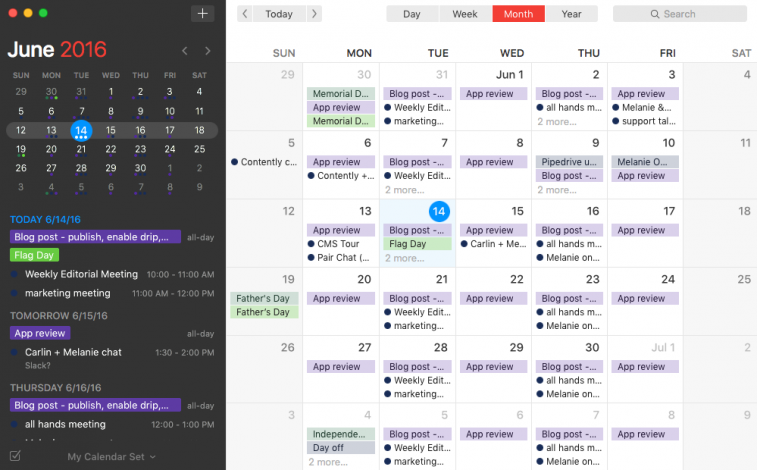
In Fantastical 2, a user will get everything he/she could dream of having in a calendar application, along with a stylish and beautiful interface that comes with it as an extra feature. This calendar application is user-friendly and offers the full control of meetings and tasks you have planned for yourself. You can easily schedule an event or check upcoming events in just a few clicks. Appointments and reminders can be managed very easily and you can add notes, locations, invitees, URLs, and lots of other things in an event.
This calendar application supports integration with Today view widget, Hand off functionality, and share extension that helps to create events through other applications. The natural language event creation of this application makes it highly popular among its users.
It lets you interact with the calendar app as frequently as you want to and on your own terms. In short, it is a viable alternative to default Calendar app.
Regardless of whether you check your calendar app every few minutes or just give it a go every now and then, the above mentioned calendar apps can help you stay organized while increasing your overall productivity. These apps will help you organize your day more efficiently. Don’t limit yourself to only one app; there are a plethora of online calendar apps that serve as productivity management tools. So go ahead and try them if you need robust options!
Mahnoor Khan
September 16, 2026  Mahnoor Khan
April 1, 2026
Mahnoor Khan
April 1, 2026 Table of Contents
